
Most Shopify stores lose revenue not from bad marketing, but from images handled incorrectly at scale. A catalog of 300 products with inconsistent dimensions, bloated file sizes or zoom-breaking resolutions quietly kills conversion before a single ad dollar is spent.
A single product is easy to get right. Ten are manageable. But as your catalog grows, things start to break.
Teams spend hours resizing, exporting and rechecking every Shopify product image. Small inconsistencies slip through. Some images stay sharp. Others blur under zoom. Page speed drops without an obvious reason.
This guide covers exactly what Shopify expects from product images in 2026, why each requirement exists and how to apply those standards in a way that holds up at scale.
Table of Contents
Why Shopify Product Image Specs Directly Affect Revenue
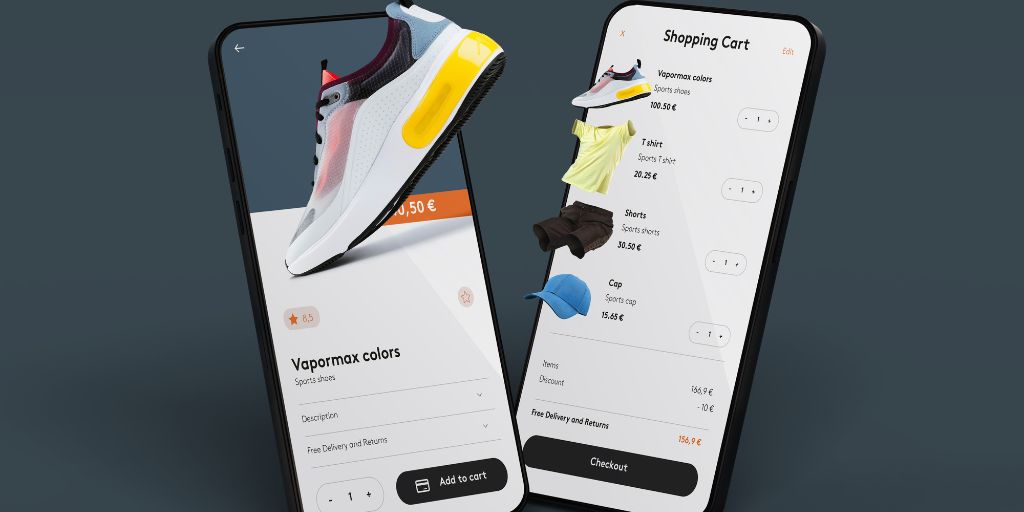
Images account for roughly 40% of total page weight on the average website and on ecommerce pages that number is even higher, with images averaging over 1 MB on the median desktop home page.
Every 1-second delay in mobile load time reduces conversions by about 7% costing retailers an estimated $2.6 billion collectively, according to Hostinger. For a store doing $500K a month with 65% mobile traffic, that adds up fast.
The risk is asymmetric. A Shopify product image that is too small triggers the platform’s auto-resize, producing a blurry render. One that is too large uploads fine but slows the page, hurts Core Web Vitals scores and pushes rankings down in Google search results.
Getting it right means hitting a precise window not just clearing a minimum.
What Are the Recommended Shopify Product Image Dimensions?
Shopify accepts product images up to 5,000 x 5,000 pixels but that ceiling is not a working target.
The recommended size is 2048 x 2048 pixels. At this resolution, images stay sharp across retina displays, desktop screens and mobile viewports without inflating file size.
For non-square formats such as apparel on a hanger or lifestyle shots, a minimum width of 2048 pixels at a 3:2 or 4:3 ratio delivers consistent sharpness without forcing an awkward crop.
One thing many merchants overlook is that consistency matters more than resolution alone. When collection grids display products side by side, a mix of 1:1 and 4:5 aspect ratios creates a visually broken layout.
Square (1:1) is the default recommendation for most Shopify themes because it works cleanly across collection pages, gallery thumbnails and mobile screens.
What File Formats Does Shopify Accept for Product Images?
Shopify supports more formats than most guides mention. Here is a clear breakdown of what each format is suited for:
| Format | Best Used For | Key Notes |
| JPG / JPEG | Product photography | Lossy compression, smaller file size, recommended for most images |
| PNG | Transparent or white backgrounds | Lossless, larger files, best for flat-lays and cutouts |
| WebP | Any product image | 25 to 35% smaller than JPEG; Shopify auto-serves WebP to supported browsers |
| GIF | Simple animations only | Not suitable for high-resolution product photography |
| HEIC, PSD, TIFF, BMP, SVG | Accepted but converted by Shopify | Better to convert yourself to control the output quality |
Use JPG for photographs and PNG only when transparency or extremely clean edges are needed such as logos or product cutouts. If your workflow exports everything as PNG by default, you are adding page weight without any real visual benefit. For page speed, WebP gives the best file-size-to-quality ratio available in 2026.
What Is the Maximum File Size for a Shopify Product Image?
The platform limit is 20 MB per image. In practice, that should never be the target.
Shopify’s own guidelines recommend keeping product photos between 200 KB and 500 KB. For mobile-heavy stores, staying under 300 KB is a stronger working target. An unoptimized product page can carry 10 to 15 MB in total image weight when the same page could deliver identical visual quality under 2 MB.
That gap has a direct cost.
According to Build Grow Scale, every 1-second delay in mobile load time cuts conversions by roughly 7%. Mobile accounts for 78% of all retail site visits, yet converts at just 1.8% versus desktop’s 3.9%. Images that miss the file size target are not just slow. They cost sales before a shopper even sees the product properly.
How Does the Zoom Feature Work on Shopify Product Images?
Zoom is one of the most-used features on a product page.
Shoppers use it to inspect texture, stitching, print quality, labels and hardware details before committing to a purchase. For zoom to activate on Shopify, a product image must exceed 800 x 800 pixels.
At the recommended 2048 x 2048 pixels, there is roughly a 2.5x zoom range before image quality starts to degrade which is sufficient for most product categories. On high-resolution retina displays, images below 1024 x 1024 will begin to soften under zoom even if the feature technically activates.
A common mistake is meeting the pixel dimension requirement while exporting at heavy JPEG compression. An image may pass the zoom threshold on paper but look muddy under magnification.
Resolution and export quality are linked. Both need to be right for zoom to serve its purpose.
Does DPI Matter for Shopify Product Images?
No. DPI (dots per inch) is a print specification. It does not affect how a Shopify product image renders on screen.
Browsers and Shopify’s CDN display images based on pixel dimensions only. A 72 DPI image and a 300 DPI image at identical pixel dimensions look the same on a monitor.
DPI becomes relevant only if you reuse product images for print materials, packaging or press kits. For print, 300 DPI at the intended physical size is standard. For Shopify, focus entirely on pixels and file size and ignore the DPI field.
How Many Product Images Should a Shopify Listing Have?
Shopify allows up to 250 images per product. You can assign specific images to variants so that selecting a color or size automatically switches the displayed photo.
For this to work cleanly, all variant images should be shot from the same angle, under the same lighting, with the same background. The only visible difference should be the variant itself.
Most high-converting product pages use between 4 and 8 images, covering the front view, back view, a close-up detail shot, a lifestyle image and a size or scale reference. Each image should serve a clear purpose rather than just adding volume.
What Does Alt Text Have to Do With Shopify Product Images?
Alt text is often treated as an afterthought but it directly affects SEO and accessibility.
When a product image fails to load, alt text is what a browser displays in its place. More importantly, it tells search engines what the image shows.
For Shopify product images, good alt text is descriptive and specific. Instead of “image1.jpg,” use something like “navy blue men’s running shoe side view.” This helps images appear in Google Image Search and improves overall page relevance for product-related queries.
Descriptive file names follow the same principle and should be applied before upload, not renamed manually afterward.
What Does Manual Image Compliance Actually Look Like at Scale?
A seasonal product drop of 120 new SKUs with four images each means 480 files to process.
A photographer delivers a mix of RAW files shot in different orientations. Some are already JPEG. Some are TIFF. Backgrounds are inconsistent across shoots. To make every Shopify product image compliant, someone on the team has to:
- Open each file in an editor
- Resize to 2048 x 2048 at the correct aspect ratio
- Remove and replace backgrounds where needed
- Export at the right compression level, targeting under 500 KB
- Verify the output exceeds 800 pixels for zoom
- Name each file descriptively for SEO
- Upload to Shopify and check mobile display
That is roughly seven steps per image. At 480 images, the work compounds fast. Experienced editors can move quickly but inconsistency creeps in. One image ends up at 1.3 MB. Another gets cropped slightly off-center. A third exports at 720 pixels, zoom breaks silently and nobody notices until a customer complains.
This is not a skill problem. It is what happens when a rules-based, repeatable task stays manual.
What a Scalable Shopify Image Workflow Looks Like
To manage images at scale, the approach itself needs to change. Instead of editing files one by one, teams need a structured, repeatable pipeline:
- Input normalization: Accept images from different sources without manual sorting
- Standardized resizing: Apply the same dimensions to every Shopify product image
- Format conversion: Automatically select the best format for performance
- Compression control: Reduce file size without losing visible quality
- Consistent naming: Maintain clean, descriptive file names for SEO
- Bulk export: Process all images together rather than individually
This treats images as part of a system, not isolated tasks. The difference shows at the first large product launch.
How Autophoto AI Exports Shopify-Compliant Images in Bulk
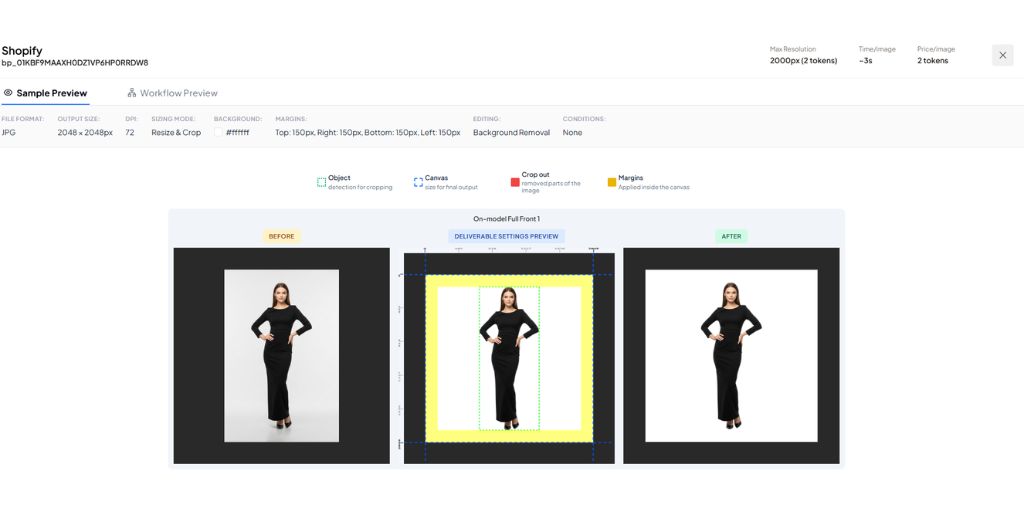
Knowing the specs is one thing. Applying them consistently across hundreds of products is where most teams run into problems.
Autophoto AI was built specifically for ecommerce image operations. You define your output rules once and apply them across your entire catalog.
The workflow runs in three steps: choose a Shopify pre-built template, upload your product images in any supported format (JPG, PNG, WebP, HEIC, RAW formats like CR2, NEF and DNG), then download fully processed, compliant images.
Here is what the default Shopify template standardizes automatically:
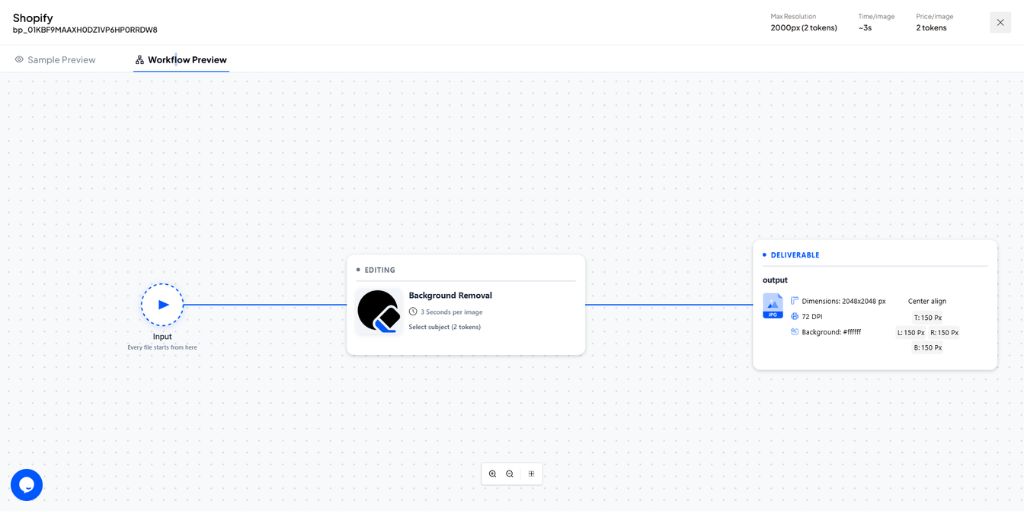
- Image size: 2048 x 2048 px
- Format: JPEG
- Background: Pure white (#FFFFFF)
- Alignment: Centered
- Margin: 15% on all sides (approximately 307 px on a 2048 px canvas)
- DPI: 72 (correct for screen use)
Behind that template, the system crops each image to a square format, removes and replaces backgrounds using AI, centers the product and applies consistent spacing. The result is a uniform catalog where every product image aligns visually, without manual editing.
Autophoto also supports generative soft shadows which add natural depth to flat-background images and make products look like they were shot in a studio rather than cut out in software.
- Manual workflow: Edit each image individually, export one by one, check quality, fix errors and repeat for every SKU.
- Automated workflow: Define rules once, process all images in one pass and upload directly.
The difference is not just time. Automation removes inconsistency. Rules enforced once stay enforced across every batch, every launch, without someone needing to remember or recheck.
This is the part most image guides skip entirely.
How Product Image Quality Connects to Conversion and Retention
Desktop converts at 3.9% while mobile converts at 1.8%, despite mobile driving 74-78% of retail site visits. That gap is not entirely about screen size or checkout flow. A significant part of it comes from image weight and rendering quality on slower mobile connections.
Stores closing the mobile conversion gap are not always the ones spending more on ads. They are the ones where every product page loads fast, zoom works properly and images look consistent across the catalog. Research shows that 83% of shoppers rely on product photos and 90% say image quality influences their willingness to buy.
From a retention angle, a shopper who zooms in and sees a crisp, high-resolution image has more buying confidence. That confidence reduces returns and increases the likelihood of a repeat purchase. Stores that automate image compliance maintain these standards on every product launch, not just the first one. That consistency is what turns one-time buyers into returning customers.
Shopify Product Image Requirements: Quick Reference (2026)
| Requirement | Recommended | Hard Limit |
| Pixel dimensions | 2048 x 2048 px | 5,000 x 5,000 px |
| Aspect ratio | 1:1 (square) | Any, but must be consistent |
| File format | JPG, PNG, WebP | HEIC, PSD, TIFF, GIF, BMP, SVG also accepted |
| File size | 200 to 500 KB | 20 MB |
| Zoom minimum | 2048 x 2048 px (800 x 800 px minimum) | Must exceed 800 x 800 px to activate |
| DPI | Not relevant for screen use | 300 DPI for print repurposing only |
| Images per product | 4 to 8 recommended | 250 maximum |
| Alt Text | Descriptive, keyword-relevant | Required for SEO and accessibility |
Taking the Next Step
Shopify product image compliance covers six practical areas: pixel dimensions, file format, file size, zoom readiness, catalog consistency and alt text. Each one affects page speed, search visibility and whether a shopper trusts what they see before buying.
The specifications themselves are not complicated. What becomes difficult is enforcing all of them consistently across hundreds of SKUs, every time new products are added. That is the difference between stores that manage images reactively and stores that run a clean, repeatable system.
If manual processing is slowing your team down with each new product launch, Autophoto AI handles the entire compliance pipeline in one pass. Set your Shopify template once, upload your raw images and get fully compliant product images ready to go live.
See how Autophoto AI processes your Shopify catalog and check whether your current image workflow can keep up with your store’s growth.