Your studio workflow is ready to include a range of eCommerce photo editing AI tools. Tools that can help you with background removal, color enhancement, cropping, image resizing and more.
But how would you choose the best tool when everyone claims to be the best? Selecting the right ecommerce photo editing ai ensures both speed and quality.
Since each studio has different requirements, they need different tools. Or, a single tool that can be customized according to their needs. This is why choosing a versatile ecommerce photo editing ai matters.
Keeping that as our baseline, we are sharing a list of 9 best ecommerce photo editing ai tools from 2026.
And to ensure that you pick the best, we are also sharing a short guide on how to choose a photo editing AI. Picking a reliable ecommerce photo editing ai will save you effort in the long run.
So, without any further ado, let’s get started right away.
Table of Contents
How to choose a Photo Editing AI?
Define quality and prioritise it
To make a choice, you first need to decide what your factors will affect your decision. Since we are talking of photo editing, the quality of output that we get from the ecommerce photo editing ai tool must be a leading factor. So from the start, decide what “good” looks like for you. This will also help you compare tools for yourself.
Test on your actual images
When you are running tests, use a batch of at least 30–100 images covering different product types, angles, lighting conditions, and difficult cases. This will help you see the limits of your ecommerce photo editing ai tool, reveal real-world accuracy, failures, and whether the AI needs manual touch-ups.
Check workflow fit and automation options
An important factor that you must consider is the tools workflow compatibility with your systems. Do you need single-image edits, bulk batches, API integration, or blueprint/workflow templates? Choose a tool that fits your production flow (tethered capture, cloud vs local, plugin vs standalone) to avoid costly process changes. A well-integrated ecommerce photo editing ai ensures seamless workflow.
Balance speed, scalability, and cost
Some tools are fast, highly scalable and at the same time costly. Evaluate processing time, per-image or subscription pricing, and how costs scale with volume. Often a cheap per-image API can become expensive at larger SKUs. A subscription with batch features might save money and time long-term while using ecommerce photo editing ai.
Control & customization options
Ideally, look for tools that let you create custom presets/blueprints. Specify rules for different product types, and offer easy manual correction. If your tools offer limited customization, Hybrid workflows (AI + human review) often deliver the best consistency. The most flexible ecommerce photo editing ai will allow full customization.
Security, file handling & vendor reliability
Confirm where images are stored/processed, retention policies, and whether the vendor can meet privacy/compliance requirements. Also check support, SLAs, update cadence, and whether the company actively improves models. This is critical when choosing a secure ecommerce photo editing ai for enterprise use.
Best Ecommerce Photo Editing AI for Professional Images
Autophoto.ai
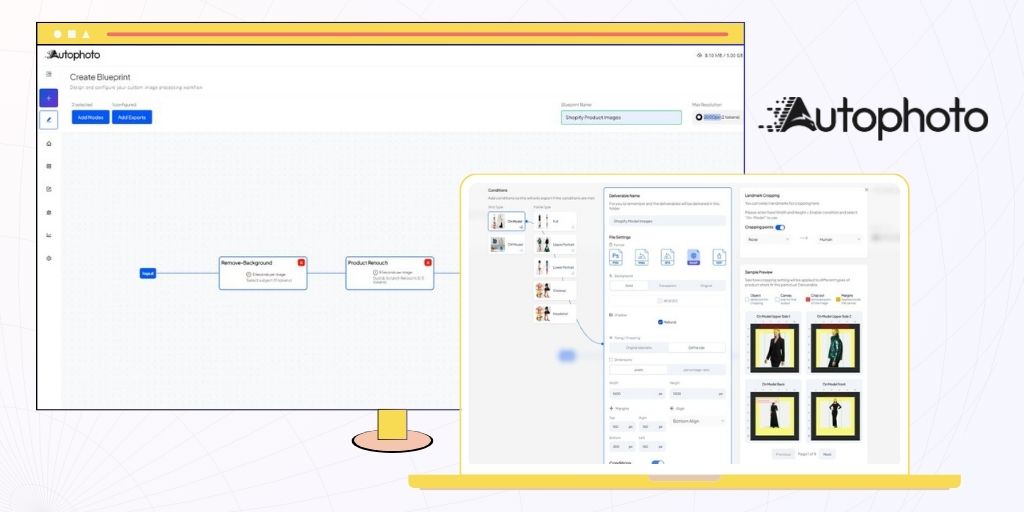
Autophoto is a leading ecommerce photo editing ai platform designed for end-to-end photo editing. It is a platform that offers rule-based & scalable photo editing workflow. To put it simply, you can upload an image and process it with custom editing specifications.
When you’re managing a growing catalogue of products and every image needs to be consistent, Autophoto.ai steps in. You can select backgrounds, cropping, margins, alignment and more. Using Autophoto.ai ensures your workflow leverages the most advanced ecommerce photo editing ai features.
Additionally, you can also set conditions on how different model and product images will be edited. This automates entire post-production processes and helps you edit thousands of images in seconds using ecommerce photo editing ai technology.
Core Features
- Batch Image Automation: Create editing blueprints with rules for image sizing, cropping, padding, export formats, and more. Apply the blueprint automatically across an entire batch using ecommerce photo editing ai.
- Background Removal & Replacement: One-click or batch removal of backgrounds, with options to replace with white, branded colour or custom scene backgrounds.
- AI Cropping & On-Model Cropping: Intelligent framing adjustments that adapt to whether you’re shooting flat lay, on-model, packshot or product alone. Moreover, for model images you can select cropping landmarks to crop your images.
- Platform-Specific Export Presets: Built-in presets tuned for leading ecommerce platforms (Amazon, Shopify, etc.) which handle sizing, file types and compression.
- PSD & Layered Exports + API Integration: For teams that need manual designer refinement, Autophoto.ai can output layered PSDs. Meanwhile, its API and token-based pricing let you plug automation into your product pipelines, DAMs and store workflows for full end-to-end processing.
Pricing
- The first 100 images are free. No credit card required.
- Pay-as-you-go: Starts at $0.03 per image (token-based).
Evoto

Evoto is a professional eCommerce photo editing AI platform built for eCommerce brands, photographers, and studios. It offers intelligent, high-quality retouching automation that enhances portraits, refines lighting, and delivers clean visuals in seconds.
Evoto is known to simplify the entire post-production process specially if you are looking for visually consistent, high-impact model shots. You can automatically retouch skin, remove blemishes, correct exposure, and even eliminate reflections or stray hair. All this while maintaining natural, realistic results.
Additionally, Evoto allows you to sync edits across entire batches. That is to apply consistent tones, and perform real-time adjustments through its tethered capture mode. This helps you shoot and edit images simultaneously for faster workflows.
Core Features
- AI Portrait Retouching: Fast, natural skin smoothing with separate acne/blemish sliders so you can keep realistic texture while removing imperfections.
- Professional Hair retouching tools: Dedicated sliders for removing flyaways inside/outside the subject outline, hair smoothing, volume and hair-shine enhancement for better background swaps.
- Background & backdrop toolkit: Backdrop continuity correction, distraction cleanup and background replacement that simplify ecommerce product and white-seamless studio workflows.
- Tethered Capture & Live Editing: Connect your camera directly to Evoto for real-time image capture and retouching during shoots.
- Custom Presets & Export Options: Save and reuse editing presets, export in multiple formats, and maintain uniform standards across projects.
Photoroom

PhotoRoom is an eCommerce photo editing AI platform built for eCommerce sellers, creators, and small brands.It offers automated background removal, batch editing, and marketplace-ready templates, helping businesses produce studio-grade visuals.
When you’re managing a large product catalog, consistency is key. And here PhotoRoom can simplify the entire process for you. You can also remove or replace backgrounds, retouch images, and apply brand-aligned templates in just a few clicks.
Additionally, PhotoRoom supports both manual and automated workflows. This allows your teams and individuals to create, edit, and publish visuals across platforms instantly.
Core Features
- Automatic background removal: One click and your subject separates cleanly from the background, ready for transparent exports or white‑background product shots.
- Bulk editing workflow: Process multiple images in a single go. This includes image resizing, background removal, cropping and export.
- Templated backgrounds & layout kits: Choose from ready‑made backgrounds, social‑media friendly templates and marketplace‑optimized layouts to maintain brand look and go live faster.
- AI retouch & object removal: Remove unwanted objects, blemishes or distractions with AI‑powered erase tools, cleaning up complex shots that would traditionally require manual Photoshop work.
- Mobile + web + API integration: Shoot on mobile, edit on the web, share with team members and scale via API automation. This cross‑device, end‑to‑end workflow is ideal for modern sellers, agencies or creators with content speed targets.
Spyne

Spyne is an AI-powered eCommerce photo editing platform built to deliver studio-quality visuals at scale. It specialises in automotive marketplaces and helps in creating high-conversion assets with precision and speed.
When you are managing thousands of vehicle listings, Spyne automates post-production with intelligent AI. You can capture, enhance, and standardize images instantly while maintaining consistent brand aesthetics in your catalog.
Spyne’s smart workflows make it easy for eCommerce sellers, automotive dealers, and marketplaces to maintain visual uniformity without manual intervention.
Core Features
- AI Background Removal & Virtual Studio: Instantly remove or replace image backgrounds with clean white, branded, or lifestyle scenes. The AI-powered virtual studio recreates professional lighting and shadows to make every image stand out.
- Image Enhancement & Retouching: Automatic lighting correction, color balance, reflection removal, and sharpening ensure each image looks crisp and professional without manual editing.
- 360° Spin & Guided Capture: Create interactive 360-degree product or vehicle spins with smartphone-guided capture workflows perfect for immersive online shopping experiences.
- Batch Editing & Workflow Automation: Upload and process thousands of images in one go. Spyne’s batch workflows and API integration automate entire editing pipelines.
- Platform-Ready Outputs: Generate optimized exports tailored for Amazon, Shopify, or automotive marketplaces with correct sizing, naming, and compression standards.
Claid.ai

Claid.ai is an eCommerce photo editing AI platform built to help brands generate, enhance, and edit professional images.
It is a platform that combines powerful AI editing with easy bulk workflows. Making it ideal for marketplaces, retailers, and online sellers managing large scale product catalogues.
From background removal to realistic scene generation, it helps you create clean, high-impact product photos that meet every platform’s visual standards.
Beyond editing, Claid.ai’s custom AI models preserve your product’s true shape, texture, and brand colours. This ensures every photo looks cohesive and conversion-ready on the store.
Core Features
- AI Background Removal & Replacement: One-click or batch removal of product backgrounds with options to add lifestyle, studio, or branded scenes. Perfect for standardising catalogues or creating engaging marketing visuals.
- Image Enhancement & Upscaling: Automatically enhance image sharpness, lighting, and resolution to meet high-quality standards without pixelation or manual retouching.
- AI Scene Generation: Generate realistic lifestyle or model-on-product images using AI. Transform plain product shots into dynamic visuals fit for ads, lookbooks, and social content.
- Custom AI Training: Upload a few product images to train your own AI model that understands your brand’s style, ensuring every generated image maintains logo, texture, and brand accuracy.
- Bulk Processing & API Integration: Process thousands of images simultaneously or integrate Claid.ai’s API into your platform for seamless, automated editing across your entire workflow.
Luminar Neo
Luminar Neo is an eCommerce photo editing ai software built by Skylum. It is designed for creators and brands who want high-quality, studio-grade visuals without the complexity of traditional editing tools.
It blends creativity with automation, offering one-click AI enhancements for lighting, background cleanup, and composition refinement.
With Luminar, you can instantly adjust lighting, retouch product surfaces, and even enhance textures for that perfect, high-definition look.
Additionally, with its AI-driven relighting, masking, and layering system, Luminar Neo makes it simple to create polished product images.
Core Features
- AI‑Powered Sky & Background Replacement / Object Removal: With tools like Sky AI, Luminar Neo can detect skies, horizon lines or unwanted elements to replaces or removes them in one click.
- Relight AI & Smart Lighting Adjustments: Luminar Neo allows separate foreground/background lighting adjustments. This gives you control to brighten product subjects while keeping the background intact.
- Masking & Layer‑Based Editing: Unlike simpler editors, Luminar Neo supports true layering and AI‑driven masks. E-commerce can benefit from this when combining product shots when isolating the product cleanly for compositing.
Fotor

Fotor is a versatile eCommerce photo editing AI and design platform. It combines intuitive design tools with intelligent automation to simplify post-production and deliver studio-quality visuals in minutes.
Fotor streamlines the process when you’re managing multiple product categories and every image needs to look consistent. You can remove or change backgrounds, enhance clarity, retouch lighting, and create promotional graphics all in one unified platform.
Additionally, Fotor’s AI-driven automation enables batch image processing, AI background removal, and instant image upscaling. This allows ecommerce teams to speed up post-production, maintain visual consistency, and publish high-quality product photos at scale.
Core Features
- AI Background Remover & Object Eraser: Instantly remove or replace image backgrounds with white, transparent, or custom designs. The AI Object Eraser clears unwanted elements to deliver clean, product-focused visuals.
- AI Image Enhancer & Upscaler: Automatically enhance photo quality by improving lighting, color, and sharpness while upscaling images for HD ecommerce displays.
- Batch Editing & Automation: Edit hundreds of product images at once—resize, rename, apply filters, and export in bulk to save time on repetitive workflows.
- AI Photo Generator & Templates: Create custom backgrounds, product mockups, and marketing visuals with text-to-image AI and a vast collection of ecommerce-ready templates.
- Cross-Platform Editor: Available on web, desktop, and mobile. This allows seamless editing and syncing across all devices for flexible ecommerce workflows.
Pixlr
Pixlr is an eCommerce photo editing AI platform built for brands, and marketers who need fast, professional-quality visuals. It combines the power of AI automation with an easy-to-use interface, allowing users to export high-quality images directly from their browser.
When you’re growing an online store, every product image needs to look sharp and consistent. Pixlr makes it happen effortlessly. From background removal and smart cropping to quick retouching. You can edit, style, and optimize thousands of product images without relying on complex editing softwares.
In addition, Pixlr’s AI-driven tools like background replacement, object removal, and generative fill speed up the entire post-production workflow. It’s a go-to platform for eCommerce businesses that need creativity, consistency, and speed all at one place.
Core Features
- AI Background Removal: Automatically detect and remove backgrounds from product images in a single click.
- AI Image Generation & Generative Fill: Generate creative visuals from text prompts or expand existing images intelligently.
- Layer & Blend Modes Support: Professional-level layer editing for advanced image compositions.
- Filters & Effects: Wide range of customizable filters, overlays, and effects to enhance product photos.
- Batch Editing: Edit multiple images at once, saving time when handling large eCommerce catalogs.
Phot.AI

Phot.AI is an eCommerce photo editing AI-powered platform tailored for eCommerce sellers and marketers. It combines advanced photo editing, generative AI, and automation tools to help you create professional-grade visuals in seconds without expertise.
When your online store depends on high-quality visuals, Phot.AI ensures every image looks polished and brand-ready. You can enhance, retouch, and generate new product visuals just using AI-driven automation.
The platform also simplifies post-production for growing catalogs. This is done by automating background edits, object removal, image enhancement, and even creative banner generation.
Core Features
- AI Background Removal & Replacement: Automatically erase, replace, or blur image backgrounds. You can switch to white, transparent, or custom brand backgrounds in a single click or batch.
- Object Removal & Replacement: Clean up visuals by removing unwanted objects, shadows, or marks. You can even replace them with context-aware AI suggestions for perfect composition.
- Image Enhancement & Upscaling: Enhance sharpness, fix lighting, and upscale low-quality images for HD-quality results, ideal for marketplaces that demand detailed visuals.
- AI Product Photoshoot Generator: Transform basic product shots into lifestyle or studio-quality images without reshoots. Perfect for eCommerce listings, catalogs, and ad creatives.
- Batch Editing & API Automation: Process thousands of images at once with AI-driven batch editing. Developers and teams can integrate via API to automate entire workflows from upload to export.
Conclusion
For studios, eCommerce brands, and content creators looking for a reliable ecommerce photo editing ai, Autophoto.ai stands out as the ultimate choice.
Its rule-based automation, batch processing, advanced AI cropping, and platform-specific export features make it perfect ecommerce photo editing ai for consistent, high-quality product visuals.
Whether you are managing thousands of images or a smaller catalog, Autophoto.ai ensures your workflow is faster, scalable, and professional.
By choosing Autophoto.ai, you are leveraging the best ecommerce photo editing is available in 2026 to enhance your post-production efficiency and deliver stunning, conversion-ready visuals every time.