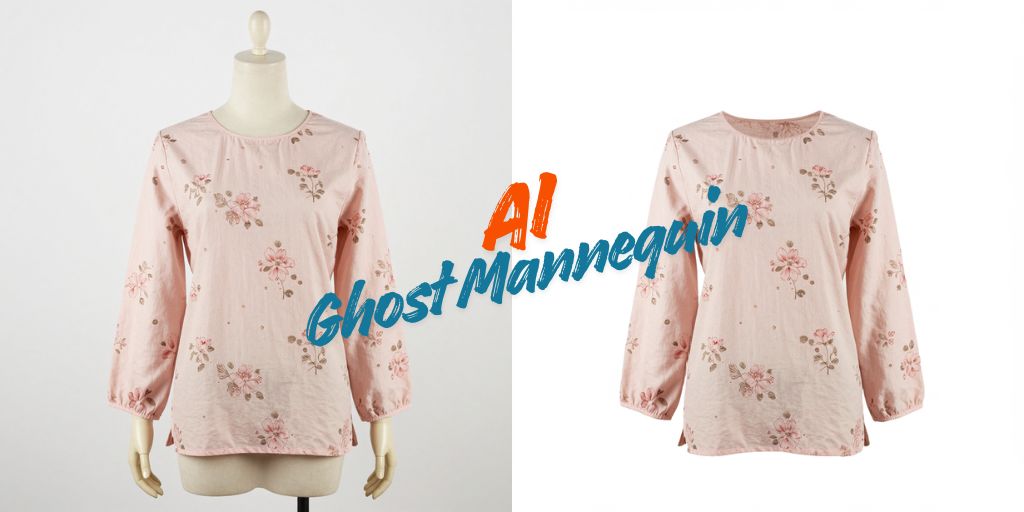
Fashion brands and eCommerce studios are under pressure to publish product images faster while maintaining consistent catalog quality across marketplaces.
AI editing tools now handle much of the production work that once required large retouching teams. Two platforms often compared for this purpose are Autophoto AI and AutoRetouch.
Both platforms support AI-powered apparel editing workflows including AI ghost mannequin, background removal and catalog preparation. The difference is not just about image quality. It comes down to workflow structure, scalability, pipeline automation, export management and operational speed.
This comparison breaks down how each platform handles ghost mannequin and catalog production in workflows, especially for fashion brands processing high image volumes.
Table of Contents
What Is the Difference Between Autophoto AI vs AutoRetouch?
The main difference between Autophoto AI vs AutoRetouch is workflow architecture.
AutoRetouch focuses on modular editing chains in which users build fixed workflows for specific editing tasks. It works well for structured image batches with predictable inputs.
Autophoto AI is designed as a larger-scale automation pipeline that automatically detects image types and routes them through different processing rules inside the same batch.
That difference becomes more important for teams handling:
- Ghost mannequin images
- Flatlays
- On-model images
- Multiple marketplace exports
- Large batch uploads
For smaller teams, AutoRetouch offers flexibility and simpler workflow customization. For larger catalog operations, Autophoto AI is designed to reduce repetitive production handling at scale.
What Does AI Ghost Mannequin Actually Cost Without the Right Tool?
Those workflow differences directly affect production costs, especially for high-volume apparel studios.
According to Autophoto AI, AI ghost mannequin can account for nearly 25% of apparel eCommerce images. For studios processing 300 garments daily, that can mean 75 mannequin-removal edits before products are ready to publish.
Manual retouching typically takes 10 to 20 minutes per image while outsourced editing costs average $1.50-$3.00 per image. At scale, that can quickly reach $300-$600 per day plus 24-48 hour turnaround delays.
Both Autophoto AI and AutoRetouch help reduce those delays and manual editing costs but the efficiency gains often depend on how well the workflow scales across mixed apparel image batches.
How Does AutoRetouch Handle Ghost Mannequin Editing?
AutoRetouch uses a chain-based workflow system for fashion eCommerce editing. Users build workflows by combining components like background removal, ghost mannequin, shadow creation, framing and export.
For ghost mannequin editing, the workflow requires two images per garment i.e. a front shot and an inlay shot showing the inside collar area. The AI combines both images, removes the mannequin, reconstructs the neckline and exports the final image as PNG or PSD.
Processing averages around 5 seconds per image according to third-party review data from FixThePhoto. The web app supports batches of up to 100 images while the API can process much larger volumes.
Pricing is pay-as-you-go. AI editing starts at around €0.10 per image while ghost mannequin editing is estimated at roughly €0.50 per image based on third-party data.
The main limitation is workflow flexibility. AutoRetouch applies the same editing chain to every image in a batch. Mixed uploads containing ghost mannequin shots, flatlays and on-model photography must be separated into different workflows which can add manual sorting and production steps for larger teams.
How Does Autophoto AI Handle AI Ghost Mannequin?
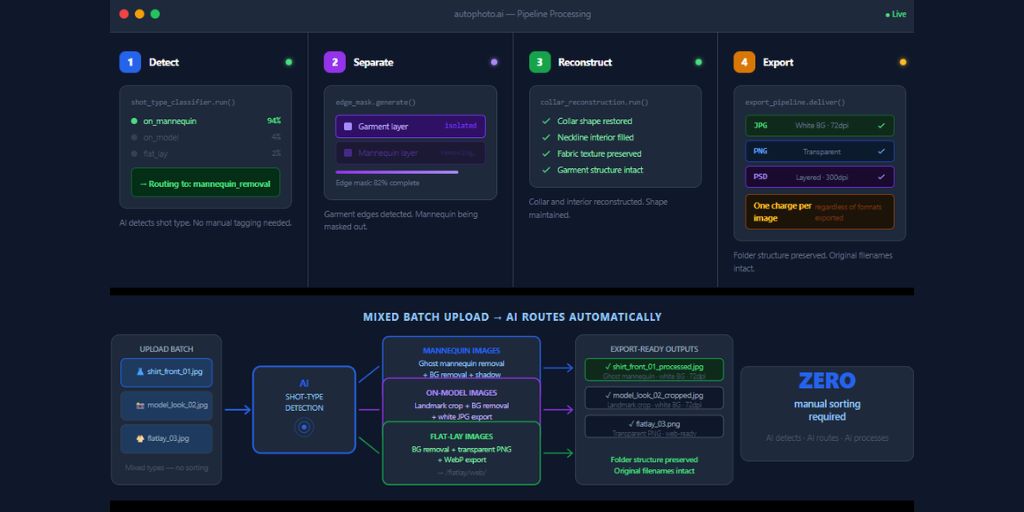
Autophoto AI handles AI ghost mannequin as part of a larger automation pipeline rather than a standalone editing workflow.
The system first detects whether an image contains a mannequin, live model or flatlay, then automatically routes each image through the correct processing rules. This removes the need for manual file sorting when handling mixed apparel batches.
AI ghost mannequin can run alongside other tasks in the same workflow including background removal, shadow generation, cropping and multi-format export. The platform supports large batch processing with uploads of 5,000+ images in a single run.
According to Autophoto AI, marketplace teams can also create category-specific pipelines that automatically apply different crop ratios, background settings, DPI requirements and export formats for different sales channels.
Pricing is token-based and subscription model. Plans start with a free tier and scale based on monthly processing volume. The system charges per processed image rather than per export variation, allowing multiple outputs from the same workflow run.
Autophoto AI vs AutoRetouch: Feature Comparison
| What Buyers Ask About | Autophoto AI | AutoRetouch |
| AI ghost mannequin | AI detects mannequin in mixed batch automatically, no manual pairing step | Requires front product shot + inlay shot per garment |
| Batch capacity (web) | 5,000+ images per upload | 100 images simultaneously |
| Conditional exports | Yes single pipeline auto-routes mixed shot types | No conditional exports inside one workflow |
| Multi-platform export | Multiple output formats in one run | Additional export passes often required |
| Pricing model | Token-based subscription (free tier available, from $35/month) | Pay-as-you-go, ~€0.10/image at Starter; min 10,000 images/year commitment |
| AI Ghost mannequin cost per image | 23 tokens (approx. $0.10 at Sampler, decreases at higher plans) | ~€0.50/image |
| AI model/video generation | No | Yes |
| Workflow structure | Automated production pipeline | Fixed workflow chains |
| Best suited fit | High-volume catalog automation | Smaller or structured editing workflows |
Does Autophoto AI Replace Manual Retouching Completely?
No, AI workflow fully removes manual review from apparel production.
Complex garments, reflective fabrics, overlapping details and inconsistent photography can still require human correction.
However, modern AI workflows reduce a large percentage of repetitive production work.
For many eCommerce teams, the main benefit is faster catalog readiness rather than perfect one-click editing.
Which Tool Is Better for Marketplace Catalog Operations?

For marketplace-focused production teams, Autophoto AI has stronger operational advantages because it handles:
- Mixed-batch routing
- Multi-platform exports
- Rule-based output logic
- Large-scale upload processing
- Automated catalog standardization
These features matter more when catalog teams process thousands of SKUs regularly.
AutoRetouch remains strong for teams focused primarily on editing flexibility and modular workflow building.
Who Should Choose Autophoto AI and Who Should Choose AutoRetouch?
Choose AutoRetouch if:
- Your operation processes fewer than 800 images per month or shoots seasonally with uneven monthly volumes
- Your images arrive pre-sorted by shot type and you have a consistent folder structure before upload
- You want per-image pricing with no monthly floor
- You also need AI-generated model imagery or video content alongside editing, AutoRetouch’s Grand Shooting partnership now covers this
Choose Autophoto AI if:
- Your studio processes 500+ images per month consistently or you manage catalog operations for multiple sellers or vendors
- Your shoots produce mixed batches with mannequin, model and flatlay shots in the same folder
- You sell on three or more platforms with different image spec requirements
- Your current outsourcing bill for ghost mannequin editing exceeds $1,500 per month
- You need a pipeline that enforces visual standards automatically across incoming catalog images, not a tool you manually run per job
Taking The Next Step
AutoRetouch is a strong option for brands with lower or inconsistent image volumes. Its pay-as-you-go pricing and structured editing workflows work well for predictable apparel batches.
Autophoto AI is built for larger catalog and marketplace operations where the bigger challenge is managing mixed image types, multiple exports and high-volume workflows efficiently.
If your current process involves frequent outsourcing, manual file sorting, or repeated export runs for different platforms, testing a real mixed-image batch is the fastest way to compare workflow efficiency. Autophoto AI offers a free trial with 200 tokens for that purpose.