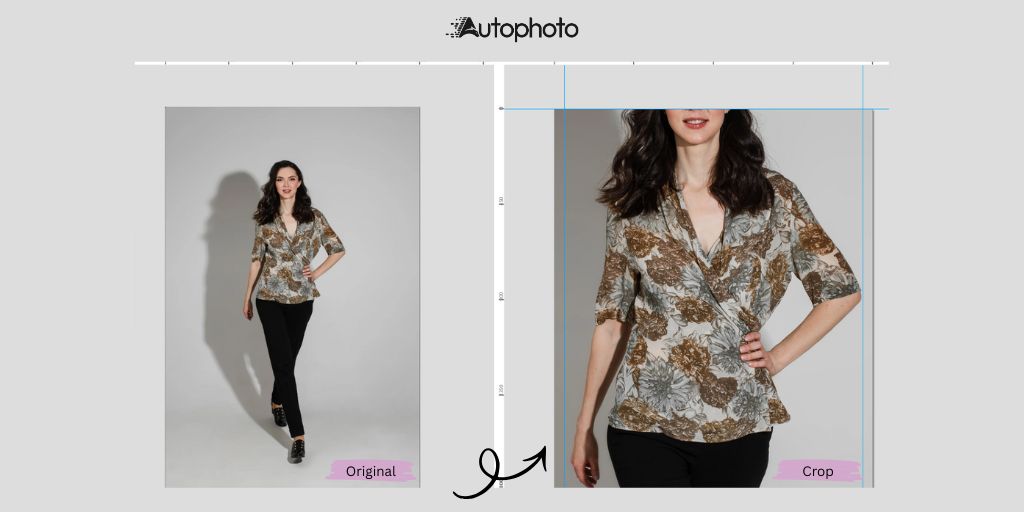
AI cropping is transforming the way images are prepared for digital use.
Tasks that once required repetitive adjustments, careful framing and attention to tiny details can now be automated in seconds without sacrificing quality.
Today’s intelligent tools analyse the contents of an image, detect the main subject and apply consistent, clean crops at scale.
Advanced approaches like Autophoto’s Model-Aware cropping go a step further by understanding human proportions, posture and body structure, making them especially powerful for model photography and fashion eCommerce.
This article breaks down how Model-Aware cropping works, why it matters for high-volume workflows and what makes Autophoto stand out from other solutions.
Table of Contents
What Is AI Image Cropping?
AI image cropping uses machine learning to identify the main subject in a photo and apply an optimized crop automatically.
Instead of manually adjusting crop handles, the AI:
- Detects the subject
- Analyzes composition
- Applies consistent framing
- Maintains accurate proportions
This leads to a faster, more reliable workflow than traditional manual cropping especially for teams handling hundreds or thousands of images.
Manual Cropping vs AI Cropping: What’s the Difference?
While both methods have value, they serve different needs.
Manual Cropping
- Creative Control: Human editors can make artistic decisions, follow strict brand rules and refine composition with intention.
- Precision: Ideal for unique layouts, complex poses or high-end retouching.
- Time-Consuming: Not scalable for large catalogs or high-volume eCommerce.
- Costly: Requires skilled editors and more labor hours.
- Inconsistent: Variations naturally arise when multiple editors are involved.
AI Cropping
- Speed: Processes large batches instantly.
- Consistency: Applies the same logic across all images for uniform results.
- Scalable: Handles growing catalog sizes with no additional resources.
- Cost-Efficient: Reduces manual labor on repetitive tasks.
- User-Friendly: Even non-designers can produce clean, professional crops.
- Continuously Improving: AI models learn and evolve to meet brand-specific standards.
For fashion and eCommerce brands managing extensive image libraries, AI cropping removes bottlenecks while maintaining the consistency customers expect.
What Makes Model-Aware Cropping Different?
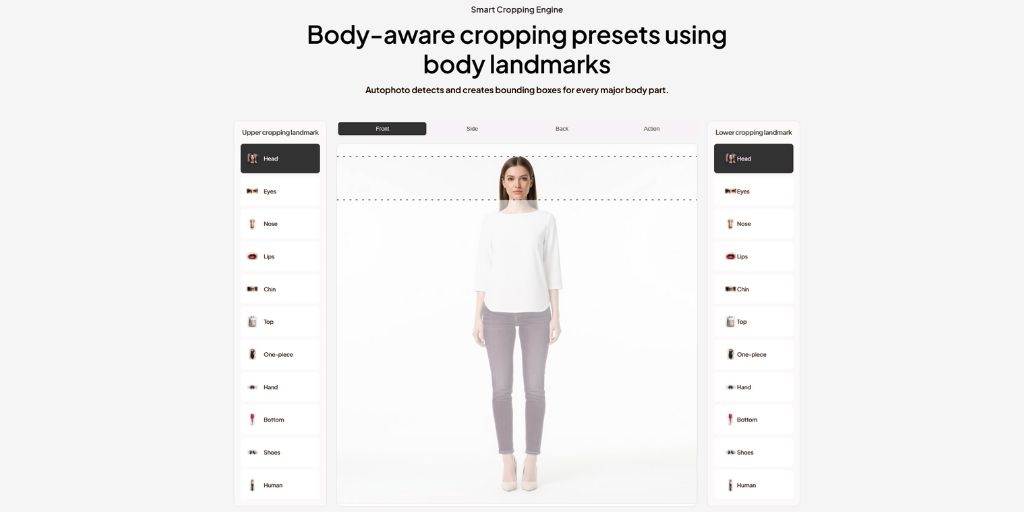
Traditional AI cropping typically identifies the most prominent subject in an image but it doesn’t understand human anatomy, poses or proportions.
Model-Aware Cropping, like Autophoto, is built specifically for images containing people. It detects detailed upper & lower body cropping landmarks including:
- Head
- Eyes
- Nose
- Lips
- Chin
- Top
- One-Piece
- Hand
- Bottom
- Shoes
- Human
This allows the system to crop images intelligently without cutting off essential body parts or compromising the natural posture and balance of the model.
Why This Matters in Fashion & eCommerce
Poor cropping leads to:
- Cropped-out hands or feet
- Uneven framing across similar images
- Inconsistent body scale
- Distracting or unprofessional presentation
Model-aware cropping prevents these issues by ensuring:
- Proper proportions (model always scaled consistently)
- Balanced framing (centered, aligned, visually cohesive)
- Brand consistency (uniform headroom, body placement, margins)
The result is a clean, polished catalog produced automatically.
The Autophoto Advantage
Fashion eCommerce requires extremely specific cropping rules to maintain brand consistency. Autophoto stands out by integrating body-aware intelligence with production-ready automation features, such as:
- Human landmark detection
- Pose analysis
- Upper and lower crop boundaries
- Clothing visibility logic
- Automatic preset selection
- PSD layered output with clean subject masks
This means editors get not only perfectly framed images but also editable layered files for downstream refinement or design integration.
Key Benefits for eCommerce Teams
1. Consistent Catalog Presentation
Autophoto ensures uniform framing across every SKU. This includes:
- Consistent headroom and foot placement
- Centered positioning
- Identical margins for full-body, half-body and close-up shots
- Preserved outfit details and proportions
Consistency improves brand professionalism and creates a seamless shopping experience.
2. Automated Workflow With Custom Rules
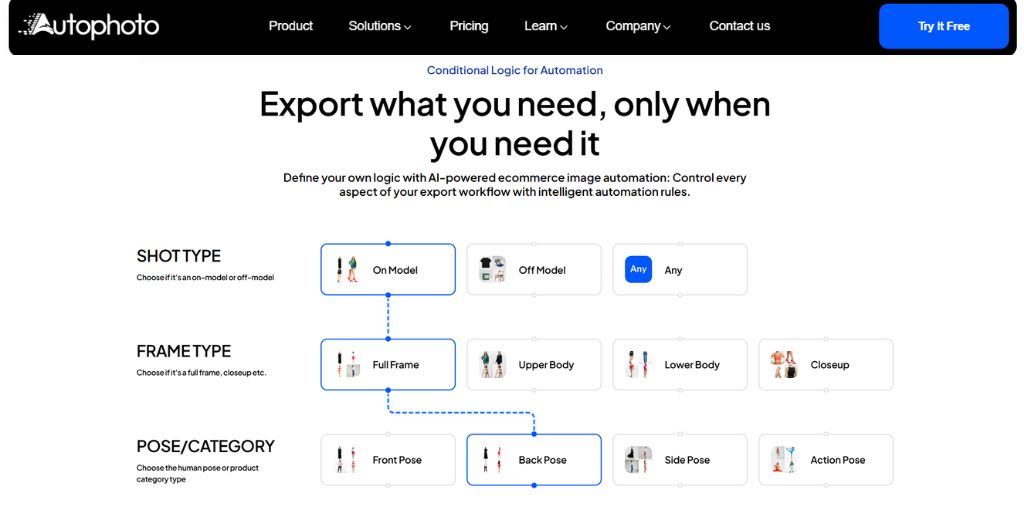
Autophoto enables users to apply conditional logic to automate the entire export pipeline. You can define presets based on:
- Shot type (on-model / off-model)
- Frame type (full body, upper body, close-up)
- Pose (front, back, side, action)
- Product category (tops, pants, dresses, shoes, accessories, furniture)
The system detects the subject and applies the correct preset automatically eliminating the manual decision-making step and significantly reducing editing time.
3. Marketplace-Friendly Crops
Different platforms like Amazon, eBay, Etsy, Shopify have unique image specifications. Autophoto helps maintain:
- Background removal
- Correc aspect ratios
- Required whitespace
- Platform-specific alignment
- Consistent framing across formats
Teams can export marketplace-ready images without reworking each file manually.
Use Cases Across Industries
Fashion Product Listings
Perfectly consistent full-body or half-body crops for large catalogs.
Lookbooks and Editorial Sequences
Stabilised framing across varying poses and angles.
Multi-Platform Exports
One upload → multiple crops for social, web, marketplaces or ads.
Mix of Mannequin and Live Model Shots
Body landmarks allow consistent framing even across different subject types.
Model Digitals for Agencies
Clean, uniform digitals delivered in minutes.
High-Volume Studio Automation
Automatic crops appear live during tethered shooting speeding up production days.
Social Campaigns & Ads
Avoids cropped-off heads, hands or feet when switching aspect ratios.
Why Autophoto Over Others?
There are several players in the intelligent cropping space, including Crop.photo and Zyng AI. They too offer AI-assisted subject detection and automated cropping but Autophoto differentiates itself in a few key areas:
1. Production-Level Body-Aware Accuracy
While others detect subjects or body parts, Autophoto focuses heavily on full-body landmark consistency ideal for large fashion catalogs.
2. PSD Layered Output
Autophoto generates clean PSDs with separated subject layers, which is not standard across competing tools.
3. Conditional Logic and Workflow Automation
Autophoto’s advanced rule-based presets allow end-to-end automation based on shot type, frame type and pose/category.
4. Studio-Friendly Real-Time Automation
Designed to integrate seamlessly into studio pipelines, enabling immediate cropped previews during shoots.
5. eCommerce-Focused Presets
Autophoto’s cropping templates are optimized specifically for fashion, product and on/off-model photography, reducing the need for manual QC.
Conclusion
Model-aware cropping marks a major shift from manual, time-consuming editing to a streamlined, scalable workflow.
By understanding human proportions and pose, Autophoto delivers consistent, professional framing across thousands of images, something traditional AI cropping alone cannot achieve.
For fashion and eCommerce brands handling large volumes of visual content, Autophoto offers:
- Faster turnaround times
- Uniform presentation
- Reduced editing costs
- Fully automated, brand-aligned cropping
Ready to streamline your workflow with body-aware automation? Start your free trial today.