
A fashion brand processing 3,000 SKUs a week uploads images in batches. Some are on-model shots, some are flat lays and some are close-ups.
Sorting and tagging these images manually takes hours. A single mistake can delay listings or cause products to fail platform checks.
This is a common problem in eCommerce. Product images are easy to create but managing them at scale is not.
AI product tagging solves this by automatically classifying and organizing images. It removes repetitive manual work and helps teams move faster with fewer errors.
In this article, we will look at how AI product tagging works, why it matters for eCommerce operations and how it supports automation in real workflows.
Table of Contents
What Is AI Product Tagging in Ecommerce?
AI product tagging is the process of using computer vision to automatically assign structured labels to product images. These labels describe what the image contains and how it is shot, not what the product looks like to a shopper.
When an image enters the system, the model reads it in layers. Early layers detect edges and shapes. Deeper layers identify textures, silhouettes and object relationships. The final output is a set of machine-readable tags, for example: Shot Type = On Model, Category = Apparel, Frame = Full Frame, Pose = Front, Angle = Side.
Shoppers never see these tags. But the pipeline does. Every downstream decision, which crop to apply, which background to use, which export format to generate, depends on this classification being accurate.
The Five Tag Dimensions That Drive Automated Image Workflows
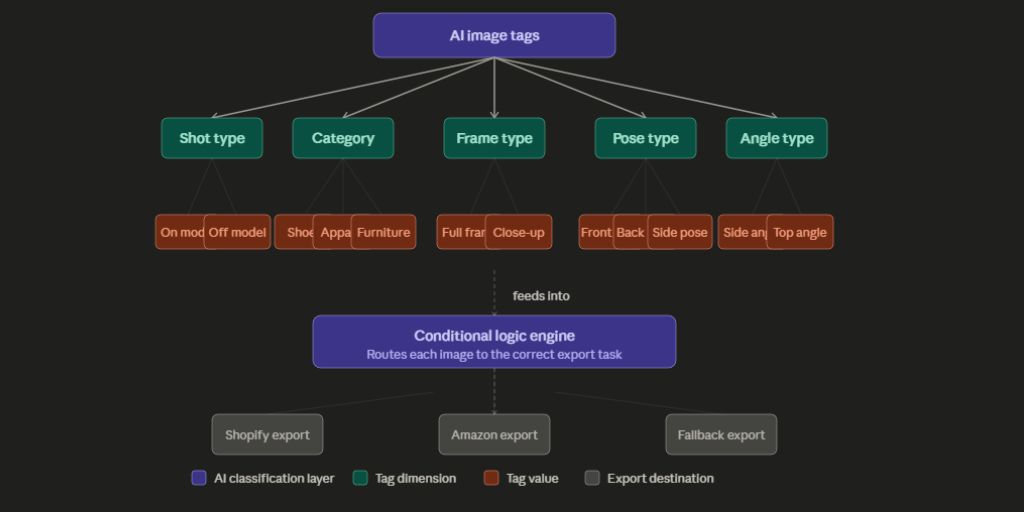
Not all tagging systems are built the same. For image operations specifically, five classification dimensions determine how a bulk workflow behaves:
Shot Type detects whether a human model is present (on model) or not (off model). This single tag changes the entire crop logic.
Product Category identifies whether the item is shoes, apparel, furniture, accessories. The category drives which preset rules apply.
Frame Type classifies the shot as full frame or close-up. A close-up shoe image needs different padding than a full-body model shot.
Pose Type identifies the model orientation: front, back or side. This determines which body landmark crop to use.
Angle Type detects the camera angle relative to the product: side, top-down or front-on. For off-model products like shoes and furniture, angle is the primary routing signal.
Each tag is narrow by design. These dimensions do not describe the product for a shopper. They route the image through the processing pipeline correctly. The diagram below illustrates how these five layers connect to the conditional logic engine and ultimately to the export destinations.
Why Manual Image Sorting Breaks at Scale
Manual tagging has two problems at scale. Inconsistency and volume.
Two different editors reviewing the same image may describe it differently. One calls it a “navy jacket,” another calls it a “dark blue coat.” In image operations, this inconsistency is worse because it means the wrong crop preset gets applied to the wrong image type.
The downstream cost is real. According to EnFuse Solutions, nearly 20 to 30 percent of online product data is miscategorized, leading to customer dissatisfaction, increased return rates and lost sales. Data from ClickPost shows that 22 percent of shoppers cite differences between the product image online and what they received as a reason for returning the item.
AI product tagging eliminates both problems. The model applies the same classification logic to image 1 and image 3,000. There is no fatigue, no subjective interpretation and no variation between shifts. For studios processing hundreds of SKUs daily, this consistency is not a convenience, it is a requirement.
How Conditional Logic Uses Tags to Route Images Automatically
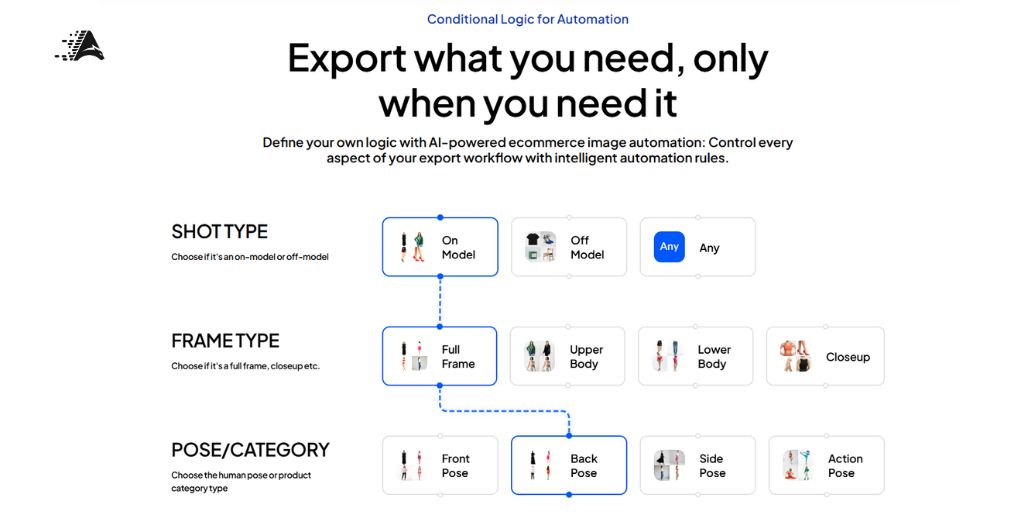
A tag on its own is just metadata. What makes AI product tagging operationally useful is what happens after the tag is assigned through conditional logic.
Conditional logic is a rule-based routing system. Each rule is a combination of tag values. If an image is tagged Shot Type: On Model, Frame Type: Full Frame, Pose: Front, then apply crop preset A, white background, 2000×2000 output for Shopify. If the same SKU generates a tag of Shot Type: Off Model, Category: Shoes, Angle: Side, then apply crop preset B, transparent background, 1200×1200 for Amazon.
Same batch. Two different outputs. Zero manual sorting in between.
This is the architecture that Autophoto AI is built around. Its pipeline uses AI tagging to read each image, then routes it through user-defined conditional tasks based on the tag combination.
A fallback node catches any image that does not match a defined rule, so unclassified images never block the batch.
Case data from Logic Inc shows that replacing manual moderation with conditional logic workflows can push daily listing processing from 1,000 to over 5,000 items while reducing moderation lag from days to seconds. The gain is not just speed. It is the elimination of the human bottleneck entirely.
Multi-Platform Export: What AI Tagging Produces at the Output Layer
Each marketplace has different technical requirements.
Amazon needs 1200x1200px, 72 DPI, JPG with a white background. Shopify needs 2000x2000px, 300 DPI, high-quality JPG. Farfetch requires an original resolution PNG with transparency. Meeting all three from one batch, without manual reformatting is the operational goal.
When AI product tagging drives the workflow, each image is classified once on upload. The conditional logic then routes it to platform-specific export presets. The image is never touched again. Folder structure and file naming stay intact throughout, which matters for large studios where post-export renaming would immediately cancel out the time saved.
A January 2025 McKinsey survey found that 92 percent of companies plan to increase AI and automation spending over the next three years, yet only 1 percent say they have matured their deployment.
That gap is where image pipeline automation is right now. The teams setting up tag-driven export workflows in 2026 are building an operational edge that most of their competitors have not reached yet.
How to Set Up an AI Product Tagging Workflow: Step by Step

Step 1
Audit your image types. List every distinct shot combination your studio produces. On-model full frame, flat lay, ghost mannequin, close-up detail. These become the basis for your conditional logic map.
Step 2
Map outputs per combination. For each shot type, write down the required crop, format, background color, DPI and output folder for each destination platform. This step is the most important and the one most teams skip.
Step 3
Run a sample batch. Upload 50 to 100 images and review the AI tag outputs for accuracy. This is where edge cases appear, for example, a flat lay that the model reads as off-model versus a ghost mannequin shot. Flag these and refine.
Step 4
Build your conditional tasks. Define one rule per tag combination. Each rule maps to a specific set of export settings. Add a fallback rule at the end to catch anything unmatched.
Step 5
Run and review. Process the full batch and spot-check the exports against your platform specifications before going live.
One critical note from Taskmonk, a data annotation platform is that the quality ceiling of any automated tagging system is set by training data quality, not model architecture.
Applied here, your conditional logic map is only as reliable as how carefully you defined it in Step 2. The AI handles the classification. The human defines the rules once.
Taking the Next Step
AI product tagging is not a discovery tool. It is infrastructure. It is the layer that tells every other part of an image pipeline what it is working with. Without it, bulk processing defaults back to manual sorting, which does not scale.
The workflow described here is classified on upload, routes through conditional logic and exports to each platform in the correct format is already achievable for high-volume teams today. What makes it practical rather than theoretical is a tool that connects all three layers in one pipeline.
Autophoto AI is built specifically for this. It combines AI image classification, conditional routing and multi-platform export in a single bulk workflow.
If your studio processes more than a few hundred SKUs per week and still routes images manually, it is worth seeing what a tag-driven pipeline looks like in practice.
You can start with a free batch at Autophoto AI.