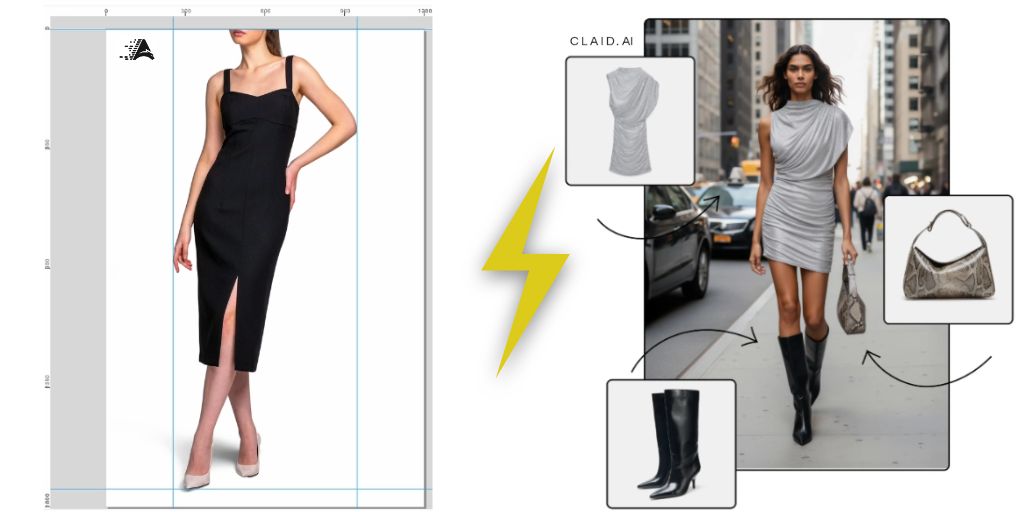
Product images are no longer single assets.
Each SKU needs multiple formats, clean backgrounds, consistent sizing and fast delivery across channels. Most teams do not slow down at the photoshoot but in everything that comes after.
That pressure is why tools like Autophoto AI and Claid AI are getting serious attention from eCommerce and catalog operations teams. Both solve real problems and carry strong reputations. But they are built for completely different workflows and picking the wrong one costs you time even if it looks cheaper on paper.
This guide breaks down how Autophoto AI vs Claid AI actually differ in practice so you can make the call based on your volume, team size and output goals.
Table of Contents
What Problem Is Each Tool Built to Solve?
Most comparison guides list features side by side, pick a winner and call it a day. But these two tools are not competing for the same buyer.
Autophoto AI: Built for Automation at Scale
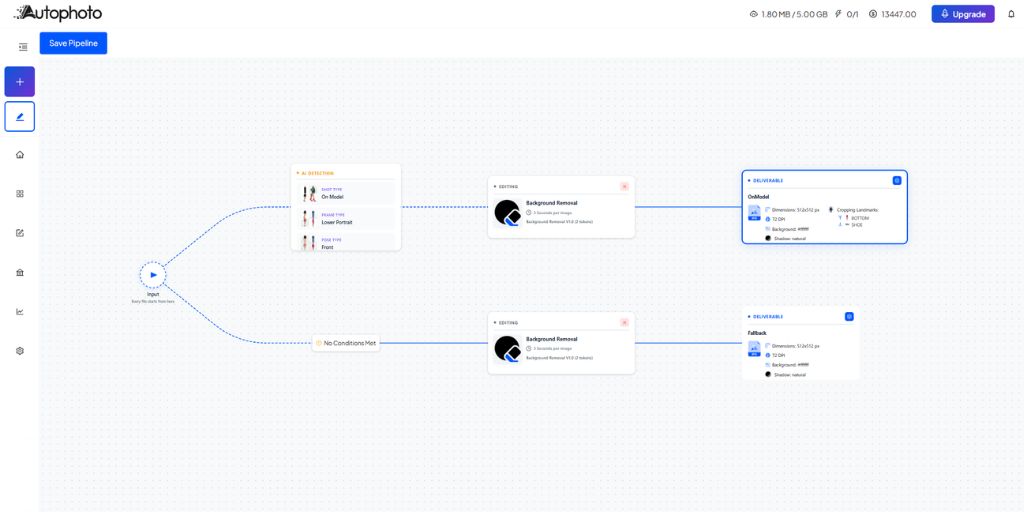
Autophoto AI is built around one core idea which is define your editing rules once, then apply them across thousands of images automatically. The platform calls these rules a “Pipeline.”
You configure background type, crop landmarks, shadow settings, margin ratios and export formats in a single no-code setup. From that point, Autophoto AI processes every image in your batch with the same precision. It handles batches of up to 5,000 images and outputs JPG, PNG, WebP, TIF and layered PSD formats simultaneously in a single pipeline run.
At its core, it is an automation pipeline built for operational scale, specifically for eCommerce studios, Amazon sellers and catalog-heavy operations teams.
Claid AI: Built for Creative Output Quality

Claid AI takes a different approach. Its strength is visual quality per image.
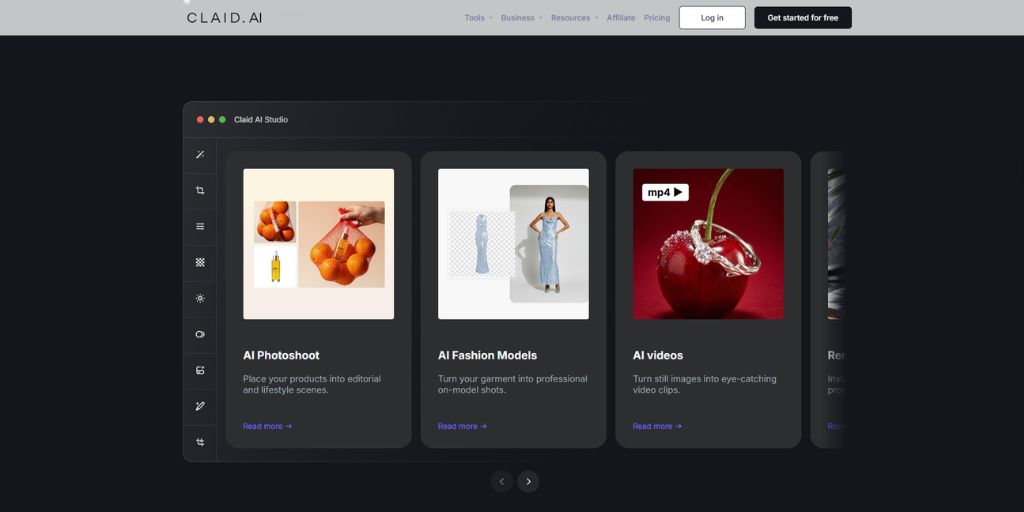
The platform is trained specifically on product photography which means it preserves logos, textures and brand colors better than general-purpose AI editors. Its AI Photoshoot feature generates realistic lifestyle scenes, on-model fashion shots and catalog-ready backgrounds directly from a plain product photo and a text prompt. For teams that need to create visuals rather than process existing ones, Claid AI is the sharper tool.
Understanding this difference up front saves weeks of testing on the wrong platform.
How the Core Features Compare
Background Removal
Both tools handle background removal accurately but the workflows are different.
Autophoto AI background removal tool runs inside a Pipeline. You do not process images one by one. You build the Pipeline, create batch, upload your images, execute, review, export and the system handles every image with consistent logic. It delivers 98%+ AI Accuracy on standard fashion and product eCommerce images.
Claid AI’s background removal is also strong with clean handling of edge cases like products with cutouts or fine edges. It processes a single image in roughly one to two seconds and works well for lower-volume or one-off editing tasks.
With under 500 images per month, both tools are competitive here. Above that threshold, Autophoto AI’s batch logic becomes noticeably more efficient because no manual image-by-image processing is involved.
Shadow Generation
Autophoto AI shadow generator tool reads each image individually and selects the appropriate shadow type automatically. Soft shadows for flatlay products, grounded shadows for footwear and natural on-body shadows for model images. If a shadow would be contextually incorrect for a specific image, the system skips it without halting the rest of the batch.
Claid AI offers shadow generation through its API and web editor but applies shadow settings more uniformly rather than making per-image composition decisions.
For mixed batches that include flatlays, model shots and packshots in the same upload, Autophoto AI’s context-aware logic eliminates the kind of errors that otherwise require manual cleanup after export.
Lifestyle Scenes and AI-Generated Backgrounds
This is Claid AI’s clearest edge. Its AI Photoshoot feature places your product into any setting you describe through a text prompt.
A skincare bottle on a marble bathroom shelf. A pair of sneakers at golden hour on a city street. The output looks photorealistic because Claid AI’s training keeps product textures, labels and colors accurate in the generated scene. The platform also provides over 100 curated background templates and supports mockup placement into existing reference photos.
Autophoto AI does not offer generative scene creation. Its background options are solid colors, transparent layers or preserved original studio backgrounds. For catalog compliance and marketplace uploads, that is exactly what most operational teams need.
For campaign imagery and social content, Claid AI fills a gap that Autophoto AI is not designed for.
On-Model Fashion Photography
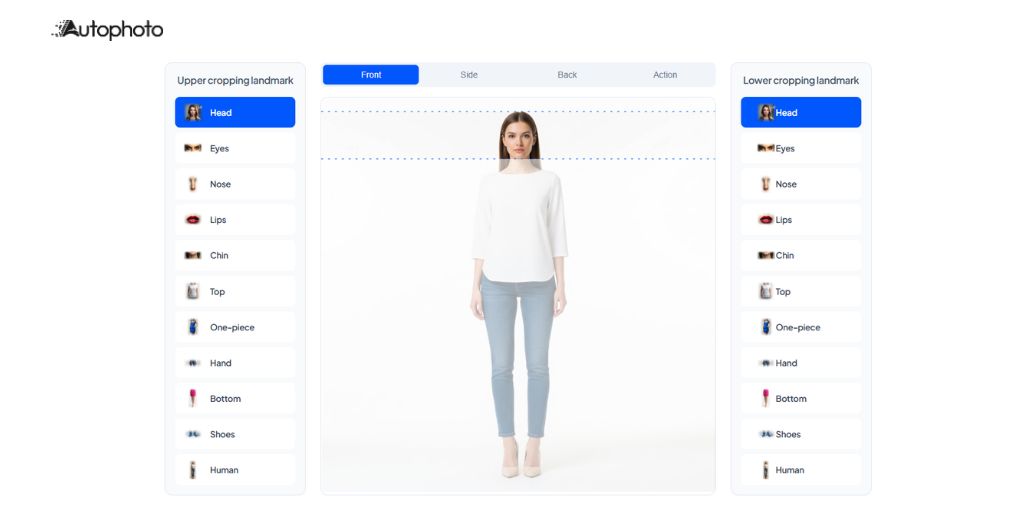
Autophoto AI handles model photography through AI landmark cropping tool. Its AI detects up to ten body-part positions including head, eyes, chin, shoulders, waist, hands, knees, ankles and shoes. You define your crop boundary once inside a Pipeline, for example from chin to knee and Autophoto AI applies that framing consistently across every model image in the batch regardless of how pose varies between photographers or sessions.
Claid AI generates on-model shots. You upload a flat-lay garment photo and Claid AI places it on an AI-generated fashion model. This is valuable for brands that photograph garments flat and need to show them on a figure without hiring models.
These address different needs. Autophoto AI standardizes large volumes of existing model shots. Claid AI creates model imagery from packshots. The right choice depends on whether your team already has model photography that needs processing or needs to generate it from scratch.
Marketplace Compliance and Multi-Format Exports
Marketplace compliance and multi-platform exports are Autophoto AI’s most distinctive capability. Each Pipeline supports up to 15 export deliverables in a single batch run. One batch can simultaneously produce a 2000×2000 white-background JPG for Amazon, a 1000×1000 transparent PNG for Shopify, a 300 DPI TIFF for print and a layered PSD for your design team. Autophoto AI charges once per AI task per pipeline run, not per deliverable, so generating 10 format variants costs the same in AI compute as generating one.
Claid AI handles batch processing through its API and produces marketplace-ready outputs. However, simultaneous multi-format conditional exports are not a native feature. Teams that need five platform-specific outputs per image will need additional workflow steps outside Claid AI.
Pricing Compared: What You Are Actually Paying at Scale
Autophoto AI Pricing (as of 2026)
Autophoto AI uses a transparent token-based model where you pay per AI task, not per deliverable.
Plans are as follows:
| Free | $0/month, 200 tokens, 1 batch at a time, 25 files per batch |
| Sampler | $35/month, 2,500 tokens, 2 concurrent batches, 250 files per batch |
| Starter | $109/month, 10,000 tokens, 3 concurrent batches, 300 files per batch |
| Solo Studio | $199/month, 25,000 tokens, 5 concurrent batches, 400 files per batch |
| Small Studio | $399/month, 60,000 tokens, 7 concurrent batches, 600 files per batch |
| Content House | $899/month, 150,000 tokens, 20 concurrent batches, 2,000 files per batch |
| Enterprise | Custom pricing and storage |
Yearly plans save up to 10 percent. The cost per token also drops as you move up plans from $0.014 per token on Sampler down to $0.004 per token on the AutoFactory yearly plan.
Claid AI Pricing (as of 2026)
Claid AI uses a credit-based subscription model:
| Free Trial | 50 credits to use on any operation, access to all standard tools, 50 API credits |
| Essentials | $15/month, 500 credits, toolset for your product image editing needs, standard resolution (up to 2K) |
| Pro | $49/month, 2,000 credits, full access to all Premium Tools (including 2K/4K generation), 3x history preservation, higher upload limits up to 64 MP |
| Business | Custom/month, advanced API workflows, custom SLAs and setup, dedicated support and onboarding, early access to beta tools and research |
Different operations cost different credit amounts. Background removal costs 2 credits per image. AI background generation costs 3 credits. Video generation costs 35 credits per five-second clip.
Estimated Monthly Cost by Volume
| Monthly Volume Image | Claid AI (Estimated) | Autophoto AI Plan | Best Fit |
| Up to 100 image | Essentials ($15/mo) | Free or Sampler ($0 to $35/mo) | Claid AI for creative output; Autophoto AI for pipeline setup |
| 100 to 500 images | Essentials to Pro ($15 to $49/mo) | Sampler ($35/mo) | Comparable cost; depends on use case |
| 500 to 2,000 images | Pro ($49/mo) | Starter ($109/mo) | Autophoto AI is more efficient when multi-format exports are needed |
| 2,000 to 5,000+ images | Business (custom) | Solo Studio to Small Studio ($199 to $399/mo) | Autophoto AI is significantly more efficient per deliverable |
| 5,000+ images, 4 export formats each | API pricing per format, multiplied | Content House or above, one pipeline run | Autophoto AI wins clearly on cost per deliverable at scale |
Costs vary by the features used per image. At low volumes, both tools are accessible. The difference becomes significant above 2,000 images per month, especially when multiple export formats are required per image.
What the Workflow Actually Looks Like in Practice
Here is how an apparel brand processing 800 SKUs per month would use each tool.
With Autophoto AI
The team uploads the full batch which contains a mix of model shots, flatlays and packshots.
One Pipeline handles all image types. Autophoto AI detects the image type automatically and applies the correct crop, background, shadow and margin rules per image. It simultaneously exports Amazon JPGs, Shopify PNGs and internal PSDs in one run.
QC review is needed only on flagged images which typically represent approx. 2% of the batch.
With Claid AI
The team uploads images through the web editor or API. Backgrounds are removed and replaced with lifestyle scenes using AI Photoshoot.
On-model images are generated from flat garment shots. Each destination format requires a separate export step. Output quality per image is high and visually polished but the workflow involves more manual handling between image types.
_____________________
Neither approach is wrong. One is optimized for operational throughput and the other for creative quality per image. Many growing eCommerce brands eventually use both: Autophoto AI for catalog processing and Claid AI for campaign creative.
ROI Snapshot: Time and Cost at Scale
| Metric | Manual Workflow | Autophoto AI | Claid AI |
| Time per image (removal + crop + export) | 3 to 8 minutes | Under 2 seconds | 1 to 2 seconds |
| Multi-format exports (4 formats per image) | 4 separate manual runs | 1 pipeline run | Separate API calls per format |
| Human QC required | 100% | ~2% (flagged only) | Varies by use case |
| Batch capacity | Limited by team headcount | 5,000+ images per batch | API-unlimited |
| Cost per image at 2,000 images/month | $1.50 to $4 (outsourced) | From ~$0.008 per token (Solo Studio) | ~$0.025 per image (background removal at 2 credits, Pro plan) |
At 2,000 images per month with four export formats each, a manual workflow consumes roughly 1,333 hours per year in editing time at 10 minutes per image. Switching to an automated pipeline reduces that figure to QC review time only.
Which Tool Fits Which Team?
Choose Autophoto AI if you:
- Manage 500 or more SKUs per month across Amazon, Shopify or multiple marketplaces
- Need multi-format exports per image without running separate batch jobs
- Run a photo studio where consistency across thousands of shots is the priority
- Need conditional export logic applied automatically across mixed image types
- Want body-landmark cropping standardized across varied model photography sessions
Choose Claid AI if you:
- Need to generate lifestyle or campaign visuals from plain product packshots
- Want on-model fashion images built from flat-lay garments without hiring models
- Process lower monthly volumes but need high visual quality per image
- Are you a small team or an individual seller who needs polished outputs without pipeline configuration
- Integrate image processing through API for enhancement and upscaling tasks
When to use both: Teams running catalog operations at scale alongside seasonal campaign production often run Autophoto AI for the catalog pipeline and Claid AI for campaign creative. This split workflow removes the compromise between throughput and visual quality.
Taking the Next Step
Autophoto AI and Claid AI are both well-built tools. They just operate in different lanes.
If your team’s main challenge is processing volume, maintaining marketplace compliance across multiple platforms and eliminating the manual export cycle, Autophoto AI addresses that directly. Its Pipeline system, conditional export logic and multi-format batch capabilities are built for catalog-scale operations and its per-task pricing model becomes increasingly cost-efficient as volume grows.
If your challenge is generating high-quality campaign visuals from limited raw photography, Claid AI delivers strong creative output with a lower barrier to entry.
The most honest way to evaluate either tool is to run your actual images through it, not a sample from their demo library.
Autophoto AI offers a free plan with 200 tokens and no credit card required. Build one Pipeline with your most time-consuming image type, run it and check what the QC queue looks like afterward. That single test will tell you more than any spec sheet. Start free on Autophoto AI here.