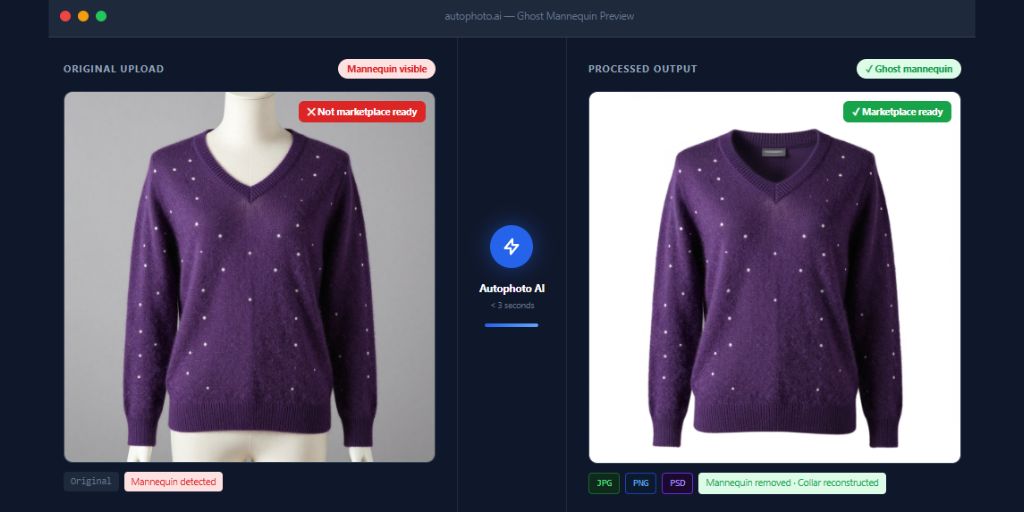
A studio shoots 200 garments on a Monday. The images are ready by Tuesday afternoon. By Wednesday morning, they are still sitting in a folder waiting for the mannequin removal.
That is not unusual. It is the standard for most apparel photography operations running on outsourced editing or in-house Photoshop. The production problem is not the shoot. It is everything that happens after.
This guide explains what ghost mannequin photography involves, what it genuinely costs at catalog scale, how AI automation changes that math and how to build a workflow that removes the delay entirely.
Table of Contents
What Is Ghost Mannequin Photography?
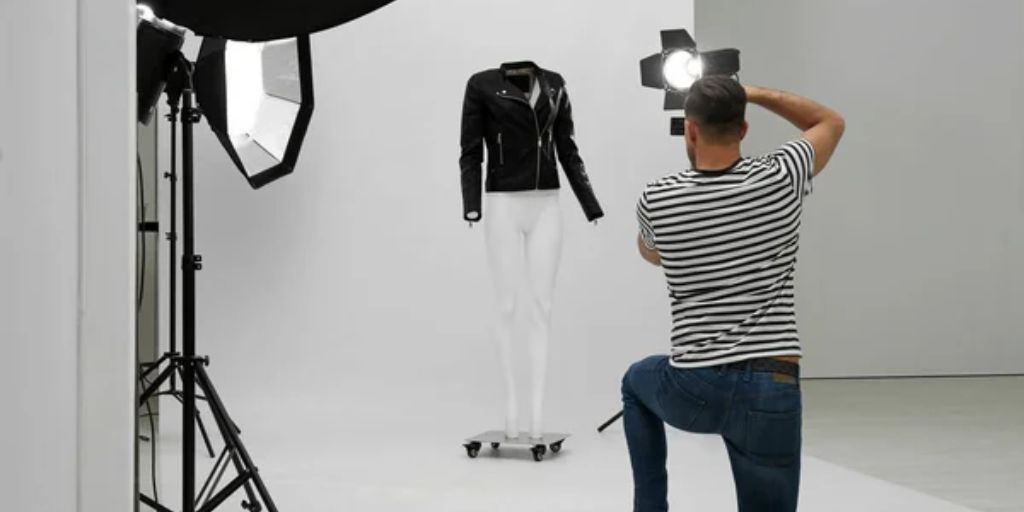
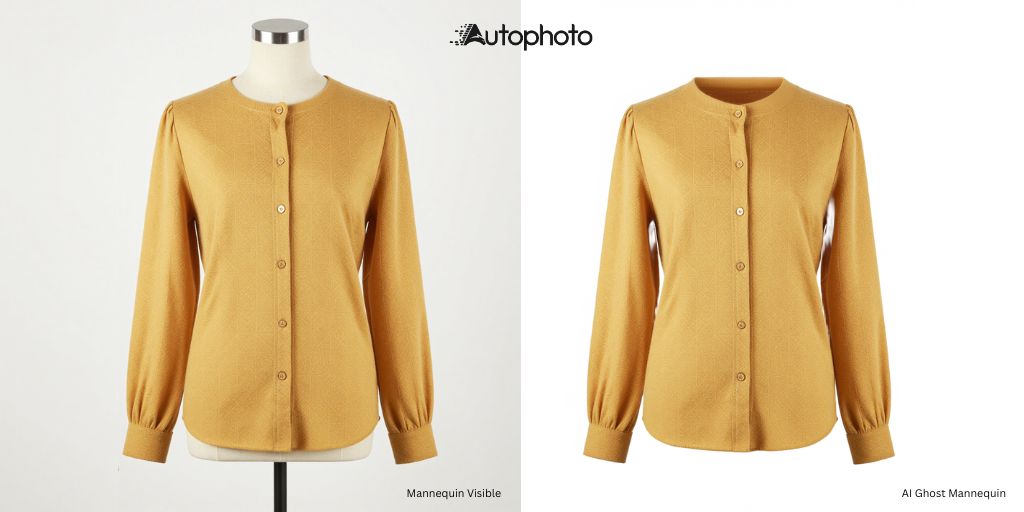
Ghost mannequin photography also called invisible mannequin or hollow man photography is a post-production technique where a garment is photographed on a mannequin and the mannequin is then digitally removed. The result is a clean, three-dimensional image showing the garment’s shape, drape and structure without any visible support.
Why Do Brands Use It?
It is a catalog standard, not a niche format. According to Pixelphant’s analysis of top fashion eCommerce brands, 57.2% use ghost mannequin presentation as part of their standard product photography mix.
Retailers like ASOS, Zara and H&M use it because it delivers structured, consistent visuals at a lower cost than live model shoots.
Why Does It Work?
The reason it converts is simple. A hoodie on a flat surface tells shoppers nothing about how it sits on the shoulders or how the hem falls. A ghost mannequin image does. For apparel eCommerce where fit perception directly affects purchase confidence that structural context is a conversion factor, not a design preference.
Impact on returns
Apparel eCommerce return rates average 25% in 2026 with size and fit issues accounting for 67% of those returns. Better product visuals reduce the guesswork that causes returns. They do not eliminate them but they reduce the gap between what a shopper expects and what arrives.
Industry Scale
Ghost mannequin accounts for roughly 25% of all apparel images on eCommerce platforms. For a studio shooting 300 garments per day, that means 75 mannequin-removal edits before a single product can go live.
What Manual Ghost Mannequin Editing Actually Costs at Scale
The technique itself is straightforward. The production cost at volume is not.
A single ghost mannequin image requires edge-aware masking around the collar, armholes and hem followed by mannequin removal, garment interior reconstruction and export to one or more formats. A skilled retoucher handles this in 10 to 20 minutes per image. At $25 to $40 per hour that puts one image at $4 to $13 in labor.
At volume, the math compounds fast. A studio processing 200 mannequin images per day at 10 minutes each needs 33 hours of retoucher time for one task on one day.
Outsourced editing bureaus bring the per-image cost down to $1.50 to $3.00 but introduce a different constraint: turnaround time. Most offshore editing services run on a 24 to 48 hour cycle. A batch that shoots on Monday publishes on Wednesday at the earliest. For seasonal drops and fast-fashion cycles that delay compounds across every batch, every week.
There is also a consistency problem. Manual retouching quality varies between operators, sessions and days. Collar reconstruction depends on who is working and how long their shift has been. At catalog scale, that inconsistency is visible to the shopper.
How AI Ghost Mannequin Technology Changes the Economics
AI ghost mannequin tools shift mannequin removal from a variable, time-proportional cost to a fixed one. This is the core economic change.
With traditional methods, doubling your image volume doubles your cost and your turnaround time. With AI pipeline processing, running 100 images or 5,000 carries the same per-image cost and the same turnaround minutes, not days.
Here is how the main approaches compare for a studio processing 200 mannequin images per day:
| Method | Cost Per Image | Turnaround | Scales Linearly |
| Manual Photoshop (in-house) | $4-$13 (labor) | Same day | Yes – headcount grows with volume |
| Outsourced editing bureau | $1.50-$3.00 | 24-48 hours | Yes – cost scales with volume |
| AI pipeline (e.g., Autophoto AI) | $0.161-$0.322 per image* | Minutes | No – fixed cost at any volume |
| Standalone AI editor (WearView, Photta) | Per-credit / subscription | Minutes | Partial – session-based, no routing |
*Autophoto AI charges 23 tokens per ghost mannequin image. Token cost ranges from $0.014 (Sampler plan) to $0.007 (Small Studio plan) putting the per-image cost at approximately $0.161 to $0.322 charged once regardless of how many output formats are produced.
A worked example: A studio outsourcing 200 mannequin images per day, 22 working days per month, at $2.00 per image spends roughly $8,800 per month. Running the same 4,400 images through Autophoto AI’s Small Studio plan ($399/month, token cost at $0.007 × 23 tokens × 4,400 images) totals approximately $1,412 per month. That is an approximate saving of $7,400 per month before accounting for the 24 to 48 hour delay that is also eliminated.
These are illustrative figures based on published pricing. Actual savings depend on volume, plan selection and current outsourcing rates.
What the Automated Workflow Looks Like in Practice
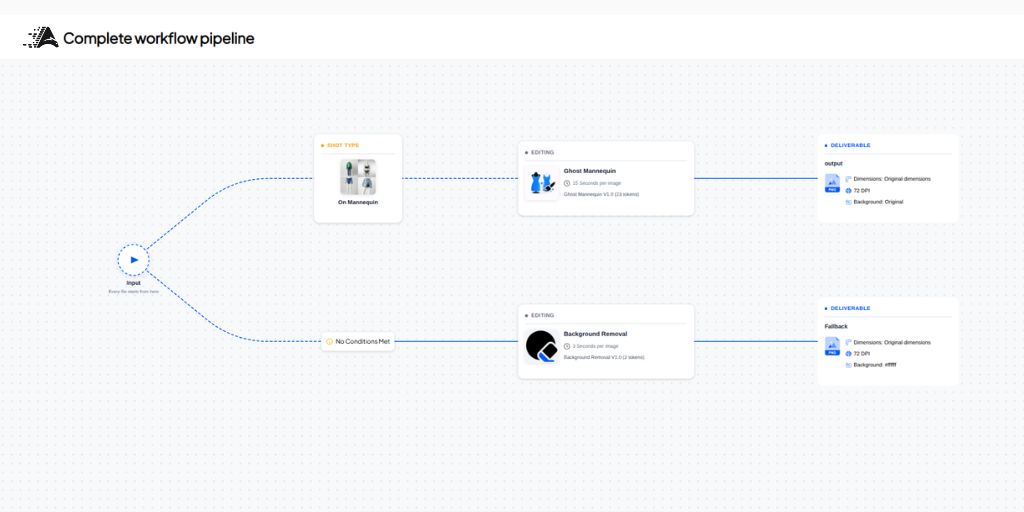
Most ghost mannequin guides describe a session-based process i.e. open a tool, upload images, download results. At the production scale, that is still a manual step you repeat for every batch. A pipeline model is different. It is configured once and runs automatically on every upload, without manual intervention.
Here is how that works in Autophoto AI’s implementation.
Step 1: Upload a mixed batch without sorting
A typical studio shoot includes on-mannequin shots, on-model shots and flat-lays often in the same folder. There is no need to separate them.
Autophoto’s AI detects the shot type of every image and routes each one to the correct pipeline rules. Ghost mannequin removal only fires on images that actually contain a mannequin.
Step 2: Mannequin removal runs automatically
For each routed image, the AI separates the garment from the mannequin using edge-aware detection, removes the mannequin and reconstructs the garment.
Collar shape, neckline interior, shoulder structure, and fabric texture are preserved throughout. Front, back and side shots are each processed as individual images through the same pipeline. Supported garment types include tops, shirts, blouses, knitwear, jackets, outerwear, blazers, dresses and jumpsuits.
Step 3: Stack additional tasks in the same run
This is where the pipeline model delivers real operational leverage. In the same pass, background removal produces a clean white JPEG for the website. A transparent PNG is generated for the design team. A layered PSD is created for the archive. Natural shadow is added if the pipeline is configured for it.
One batch upload, one charge per image regardless of how many output formats are produced. Background removal adds 2 tokens per image; all export formats from that image are free.
Step 4: Outputs land in your existing folder structure
Processed images return in the same folder hierarchy as the upload with original filenames intact. For studios with naming conventions, say, all mannequin files tagged “MNQ” meta rules route by filename or folder name automatically. Your existing naming logic becomes pipeline routing logic with no manual separation required.
The practical result: a batch that shoots on Monday processes that same night and is ready for review by Tuesday morning.
Session Editor or Pipeline Automation: Which One Do You Actually Need?
The AI ghost mannequin tool market splits into two categories that look similar from a feature list but work very differently in daily operations.
Session Editors
WearView, Photta, PixFocal, Photoroom are capable tools for single-session processing. Upload images, process and download. For brands with fewer than 100 images per batch or teams just starting to standardise their catalog photography, these tools handle the job well and carry a lower entry cost.
Their ceiling is operational. They do not detect and route mixed batches automatically. They do not preserve folder structure. They do not stack with other post-production tasks in the same run. They do not output layered PSDs. For small catalogs, none of that matters. For studios running daily production batches, each of those gaps adds manual work back into the process.
Pipeline Tools
Platforms like Autophoto AI work differently. AI ghost mannequin removal is a task inside a configurable automated workflow and not a feature opened image by image.
AI shot-type detection routes the right images automatically. Task stack, removal, background processing, cropping, shadow and multi-format export run together in one pass. Outputs return to your folder structure. Batches scale to 5,000+ images.
| Note: If you process 20 to 30 images per week, a session editor is the right starting point. The pipeline model earns its value at daily production volume. The AI ghost mannequin tool market splits into two categories that look similar from a feature list but work differently in operation. |
Stage-Based Recommendation: Where to Start Based on Your Volume
Early-stage brands (under 100 SKUs, seasonal catalog updates)
Start with a session-based AI ghost mannequin tool.
At this stage, shooting discipline matters more than automation, consistent studio background, consistent mannequin positioning, steamed and lint-free garments. AI tools produce cleaner results from clean inputs. Get the photography right before investing in pipeline infrastructure.
Growing studios (100 to 1,000 images per week, regular production cycles)
This is where AI pipeline processing becomes financially compelling. Outsourcing costs are rising and turnaround time is becoming a scheduling constraint.
Configure a first pipeline for your most common shot type and run a test batch before committing to a plan. Autophoto AI’s Small Studio plan ($399/month, 60,000 tokens) supports up to 600 files per batch and 7 concurrent batches, a practical fit for studios at this volume.
Every new account starts with 200 free tokens, enough to run a real batch and see the output before spending anything.
High-volume ops teams (1,000+ images per week, mixed supplier batches, multi-brand)
Full pipeline automation is the operational baseline at this scale.
Key evaluation criteria: batch size ceiling (Autophoto AI handles 5,000+ images per run), API and SFTP access for system integration, support for multi-brand pipelines with separate rules per brand and conditional routing by filename or folder name.
The Content House plan ($899/month, 150,000 tokens, 2,000 files per batch) and BatchScale/AutoFactory annual plans are designed for this tier.
Does Ghost Mannequin Photography Actually Improve Conversions?
The data on structured product photography is consistent. High-resolution product images produce a 33% higher conversion rate compared to low-quality visuals. Ghost mannequin presentation specifically outperforms flat-lay across garment categories.
Research by HelloEdits found that formalwear sees a 41% average conversion uplift over flat-lay, outerwear 45% and casualwear around 29%. These are category-level averages and will vary by brand, traffic source and price point but the direction is consistent.
The return rate picture is more nuanced. Better fit visualization helps shoppers make more confident purchase decisions which reduces “it did not look like the photo” returns that push apparel return rates toward 25 to 40%. It does not fix sizing inconsistencies or delivery issues which are separate drivers.
Ghost mannequin photography is one lever in a returns reduction strategy an important one, but not the whole solution.
Taking the Next Step
The post-production bottleneck in apparel catalog photography is predictable and well-understood. Manual retouching and outsourced editing both hit the same ceiling i.e. cost and turnaround time scale with every image you shoot.
AI ghost mannequin automation breaks that relationship. Per-image cost drops. Turnaround goes from days to minutes. Output quality stays consistent regardless of batch size. The workflow runs automatically once it is configured.
If you are evaluating whether this fits your operation, the most useful thing to do is run a real batch on your actual images. Autophoto AI gives every new account 200 free tokens enough to process a full test batch through a configured pipeline before any commitment.
The comparison that tends to settle the decision is not a feature table. It is seeing your batch from Monday evening ready before Tuesday morning begins.